How to Upgrade to a Paid Plan on the Musaffa Web
Last updated Over 1 year ago
This guide provides a straightforward walkthrough of the process for upgrading to a paid subscription on the Musaffa web application. Each step is designed to be clear and easy to follow, ensuring a smooth upgrade experience.
Step 1: Understand the Plans
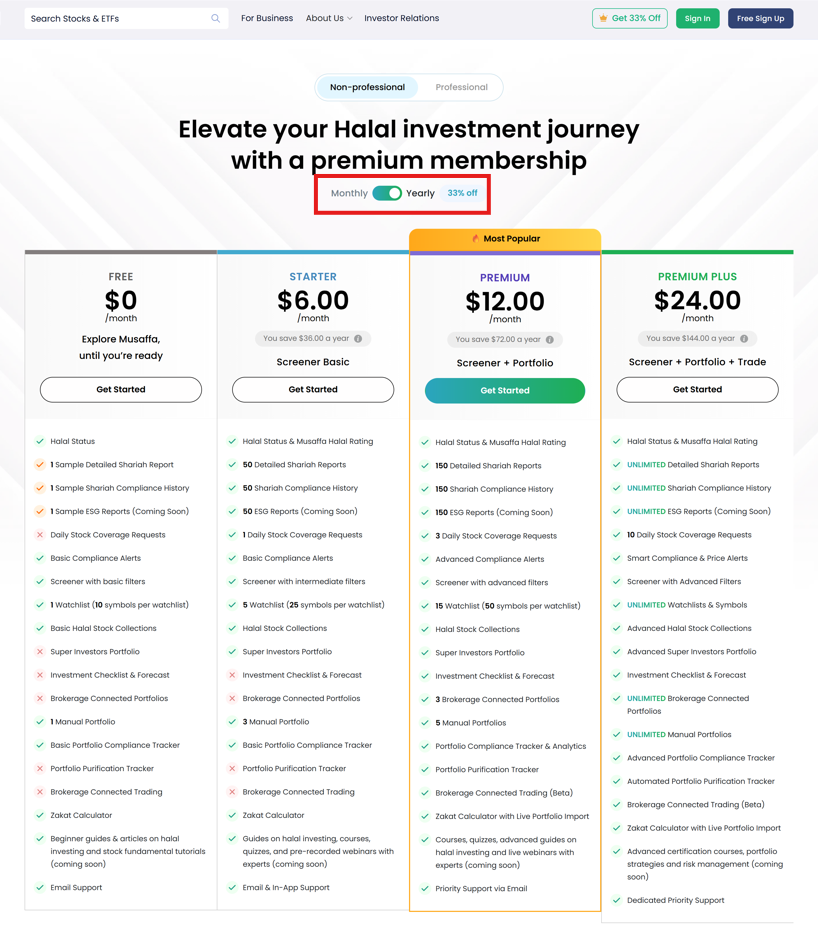
Before upgrading, it's important to know what each plan offers. Musaffa has three paid tiers: Starter, Premium, and Premium Plus. The features of these plans are consistent across both the web and mobile versions.
To compare the benefits and determine which plan is right for you, you can review the detailed breakdown of each on the Musaffa pricing page.
Step 2: Log in to Your Account
To begin the upgrade process, you will need to be logged into your account.
Navigate to the Musaffa website.
Log in with your email and password.
Step 3: Access the Upgrade Page
Once you are logged in, you can find the option to upgrade directly from your account's main page.
From your account homepage, locate and click on the "Upgrade" button.

This will take you to a page where you can see all of the available subscription plans.
Step 4: Choose a Plan
Now you can select the plan and billing cycle that best suits your needs.
Choose between the Starter, Premium, or Premium Plus plans.
Select either a monthly or an annual subscription.
Step 5: Adjustments for Upgrades
If you are moving from one paid plan to another, the cost will be adjusted based on what you have already paid. Musaffa will automatically pro-rate the amount.
Here’s an example:
Let's say you have a Musaffa Starter (Monthly) plan at $9/month. After 15 days, you decide to upgrade to the Musaffa Premium (Monthly) plan, which costs $18/month.
You have used half of your Starter plan, so you have a $4.5 credit for the remaining, unused portion.
This $4.5 credit will be applied to the cost of your new Premium plan, reducing the initial payment.
Step 6: Complete the Payment
Finally, you will review your selection and complete the purchase..
Follow the prompts to complete your payment securely.
Important Notes
You can only have one active plan at a time.
Before upgrading, be sure to review the plan benefits and the covered markets to ensure they meet your needs.
Was this helpful?
Still need help? Ask the team